
Chapter 12
Snapshots and sources
Tesela’s “live” layers (heat hotspots, burns) change when new data arrives. That is useful for exploring, but not for delivering a report that someone must be able to reproduce months later. Snapshots exist for that purpose. Alongside them, the “Sources and licenses” panel tells you where the data comes from and how you must cite it.
Snapshots
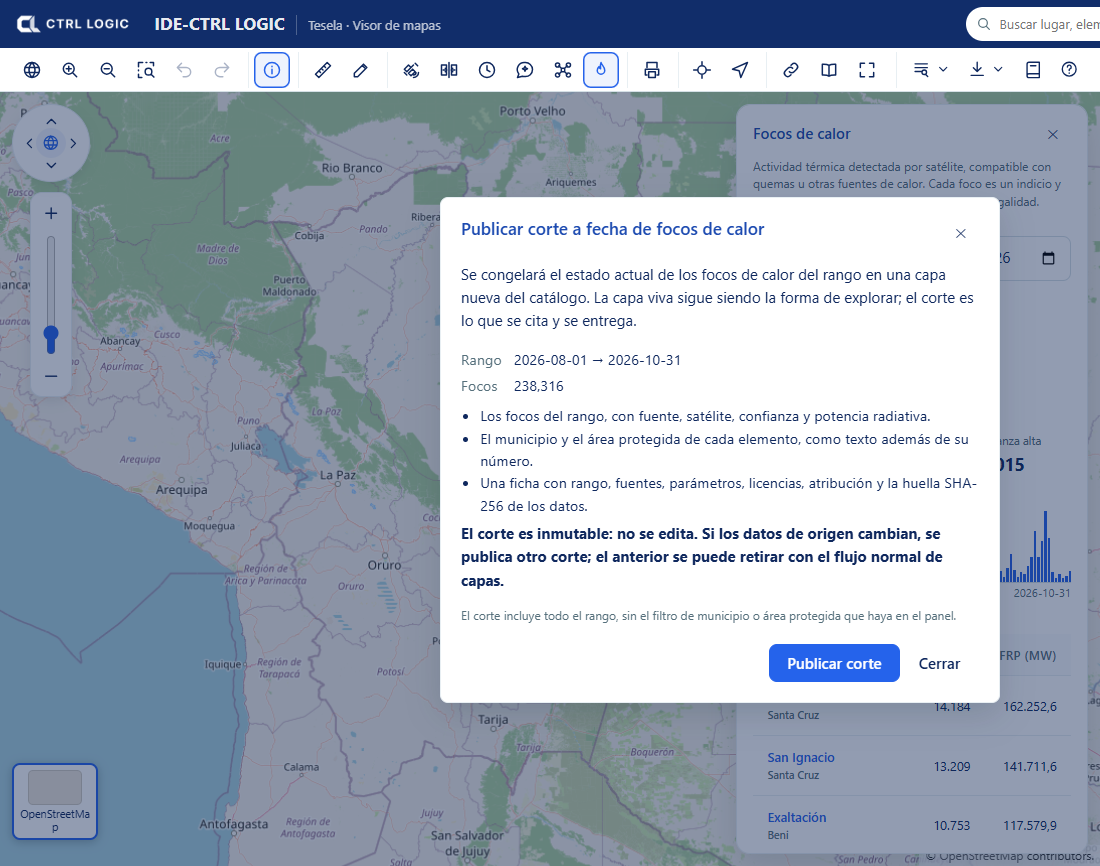
A snapshot is a frozen, immutable copy of the state of the data on a given date, published as a new catalog layer. The idea is simple: the live layer is for exploring; the snapshot is what is cited and delivered.
What a snapshot contains
- The data of the range or of the analysis: for heat hotspots, each hotspot with its source, satellite, confidence and radiative power; for burns, the areas with their estimated severity and their mean dNBR.
- The municipality and the protected area of each feature, as text in addition to their number.
- An ISO 19115 metadata record with range, sources, parameters, licenses, attribution and the SHA-256 fingerprint of the data. The fingerprint is a digital signature: if a single data item changed, the signature would be different.
How to publish a snapshot
- In the “Heat hotspots” panel, or in the sheet of a burn analysis, click “Publish snapshot”. You need the “Publish and withdraw” permission.
- Read the dialog: it states the range, the number of features and what will be frozen. The snapshot includes the whole range, without any municipality or protected-area filter that you have set in the panel.
- Click “Publish snapshot”. When it finishes you will see the layer, the snapshot date, the features and the SHA-256 fingerprint, with links to “Open the layer record” and “Go to the catalog”.
Rules worth knowing
- Immutable. A snapshot is not edited. If the source data changes, another snapshot is published; the previous one can be withdrawn through the normal layer flow (see “Catalog and layers”).
- Idempotent. With the same parameters and the same data on the same day, no duplicate is created: the system warns “An identical snapshot from today already existed” and shows you that one.
- Reproducible. What you deliver today can be verified tomorrow by comparing the SHA-256 fingerprint.
- With its own record. The snapshot layer appears in the “Snapshots” group of the table of contents and in the catalog. If the record is left incomplete (for example, without a contact), the catalog warns you and it is advisable to complete it before delivering the snapshot.
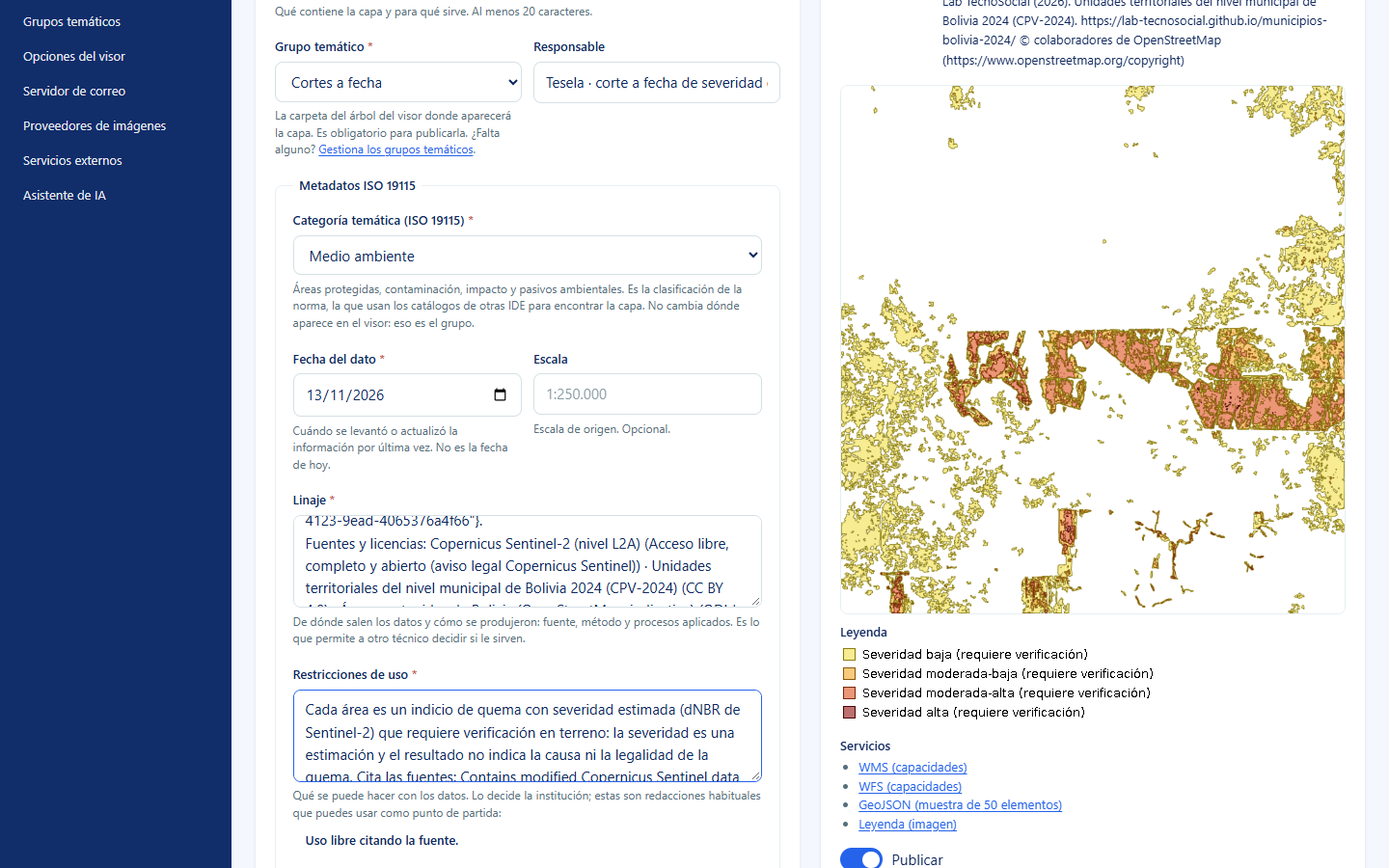
A snapshot freezes indications, not conclusions. Each feature still requires verification, as its legend and its use restrictions state.
Sources and licenses
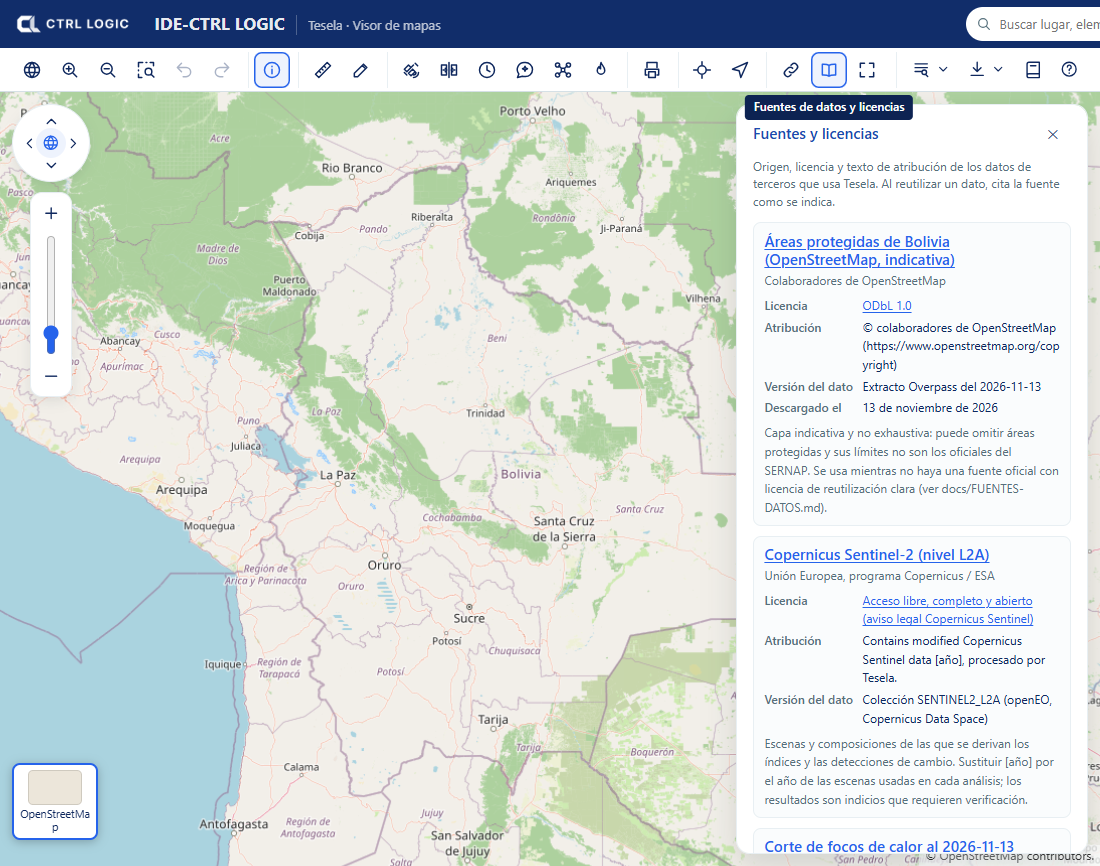
The “Sources” button on the viewer toolbar (“Data sources and licenses”) opens a panel with the origin, license and attribution text of the third-party data used by Tesela. When you reuse a dataset, cite the source as indicated.
For each source the panel shows:
- The name and the institution that produces it.
- The “License”, with a link to the text.
- The “Attribution”: the exact phrase you must include when citing.
- The “Data version” and the download date (“Downloaded on”), where applicable.
- A usage caveat. For example, the protected areas in the demonstration come from OpenStreetMap and are indicative and non-exhaustive: they may omit areas and their boundaries are not the official ones.
The external layers registered by the administrator (see “Settings”) also show their owning institution next to each layer. That data belongs to third parties and is only displayed: Tesela does not validate it or answer for how current it is.
Summary
- Live layer for exploring, snapshot for delivering.
- A snapshot is a frozen, immutable copy, with an ISO record and SHA-256 fingerprint; repeating it with the same data does not create a duplicate.
- “Sources and licenses” tells you where each dataset comes from and how to cite it.